New Allergen Menu Filtering Helps Customers Make More Informed Choices Before Ordering
For anyone living with a food allergy or intolerance, choosing from a menu can involve far more than deciding what sounds appealing.
Customers may need to work through allergen symbols, open individual dishes or ask several questions before they can begin narrowing down their options.
The latest update to the Allergen Checker customer-facing menu is designed to make that first stage much easier.
Customers can now select the allergens or intolerances they need to avoid and automatically remove dishes containing those allergens from the menu.
They can also choose whether to remove dishes carrying a trace or “may contain” warning, giving them greater control over how they explore the food available.
See the new menu filter in action
On the customer-facing menu, diners can select one or more of the 14 regulated allergens.
Once an allergen has been selected, dishes containing that allergen are removed from view. Customers can select several allergens at the same time, helping them focus on the dishes that do not list their chosen allergens as ingredients.
They can also activate the Exclude Trace Allergen option. This removes dishes recorded as potentially containing a trace of the selected allergen.
Explore the live demonstration menu
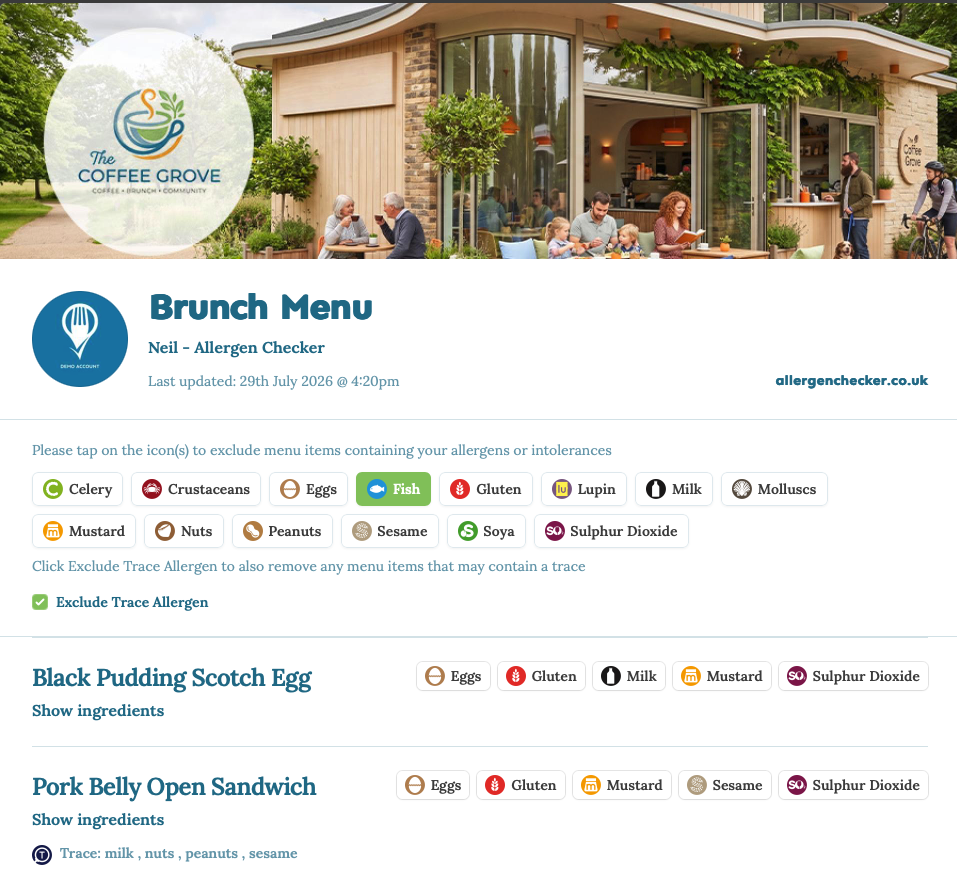 Customers can select the allergens they need to avoid and choose whether dishes carrying trace or “may contain” warnings are also removed.
Try it for yourself - Click here
Main allergens and trace warnings are treated separately
An allergen deliberately used as an ingredient is different from a precautionary statement that a product or dish may contain a trace of that allergen.
The new filtering system allows customers to choose how they want to view the menu:
Selecting an allergen removes dishes where it is recorded as an ingredient.
Selecting Exclude Trace Allergen also removes dishes carrying a trace or “may contain” warning.
This distinction gives customers more useful information without describing the remaining dishes as allergen-free.
A filtered menu should be treated as a helpful starting point rather than a guarantee. Customers should still tell the food business about their allergy so staff can discuss preparation, substitutions and possible cross-contamination risks.
The FSA advises businesses that free-from claims require strict controls and that customers should be informed when cross-contamination cannot be avoided.
Written allergen information before ordering
Customers should not have to begin their experience by searching for an allergen folder or trying to identify the right member of staff to ask.
An Allergen Checker QR code can be added to:
Printed menus
Table talkers
Menu boards
Counters
Posters
Websites
Digital screens
Customers can scan the code and review the relevant menu before ordering. The menu can show the ingredients and allergen warnings recorded against each dish, while the filtering function helps them narrow down their possible choices.
Allergen Checker creates live digital menus and downloadable QR codes that businesses can use on menus, posters, signage, packaging and other customer-facing materials.
This does not remove the need for staff communication. Instead, it gives customers useful written information before the conversation begins.
They can identify possible choices first and then speak with the team about their individual allergy and how the food will be prepared.
Supporting the updated FSA guidance
The FSA’s guidance for non-prepacked food says that written allergen information supported by a conversation works best for consumers.
Businesses serving non-prepacked food must provide information about the presence of the 14 regulated allergens. The FSA guidance recognises written information on menus, chalkboards or information packs, alongside verbal communication supported by a clearly visible notice.
Allergen Checker helps establishments put this best-practice approach into action by making written information accessible through the customer-facing menu.
Rather than relying on verbal communication alone, customers can access allergen information before ordering and without first needing to ask.
Staff can then support that written information with the important conversation about the customer’s requirements, preparation procedures and cross-contamination controls.
Allergen Checker does not replace:
Effective allergen-management procedures
Accurate ingredient and supplier information
Staff training
Good communication
Cross-contamination controls
It provides catering teams with a clearer and more accessible way to communicate the information they already manage.
Preparing for the direction of Owen’s Law
The Food Standards Agency Board has said it would like written allergen information to become mandatory in the non-prepacked sector.
It has also supported an expectation that written information should be accompanied by a verbal conversation, providing an additional layer of protection for customers.
These aims closely reflect the direction being advocated through the Owen’s Law campaign: clearer written allergen information at the point where customers are choosing and ordering their food, rather than relying entirely on spoken information.
Although the current written-information approach is expressed through FSA best-practice guidance, food establishments can begin preparing for that direction now.
Using a live digital menu can help businesses:
Make written allergen information easier to access
Provide information before customers order
Reduce reliance on memory and verbal communication alone
Support more consistent processes across kitchen and front-of-house teams
Keep information together across several menus
Prepare for possible future changes to allergen requirements
It is a practical improvement businesses can make now, rather than waiting for further regulation.
A better experience for customers and catering teams
For customers, the new functionality provides more control over how they explore a menu.
They can choose the allergens relevant to them, decide whether trace warnings should also be excluded and narrow down the dishes they may wish to discuss with staff.
For catering teams, one customer-facing menu can serve different requirements without producing separate versions for each allergy or intolerance.
When a dish, recipe or ingredient changes, the information can be updated centrally rather than leaving outdated printed matrices or folders in circulation.
Allergen Checker enables businesses to record ingredients and allergens, build dishes, create digital menus and generate QR codes for customers to access.
The aim is not to reduce communication between customers and staff.
It is to create a better-informed conversation supported by clear written information.
Make allergen information easier to access
Allergen Checker helps food establishments give customers access to written allergen information before ordering and without first needing to ask.
The new menu-filtering functionality makes it easier for customers to explore their options while helping food businesses respond to current FSA best practice and prepare for the direction advocated through Owen’s Law.
Explore the live demonstration menu
Start using Allergen Checker for free
Stay ahead of allergies. Make the smart choice.